Table of Contents
ToggleWhen it comes to finding the best printer for your home, I know how important it is to make the right choice. The right printer can truly transform your printing experience, making it more convenient, efficient, and enjoyable.
In this article, we test and review the best 3 printers in the market, aiming to help you make an informed choice for an enhanced printing experience at home. Whether you’re printing basic documents or cherished photos, this comprehensive guide will assist you in finding the perfect printer that aligns with your specific needs and budget.
I’ll help you navigate the market, and consider your specific needs and budget, so you can confidently bring home the ideal printing solution that perfectly suits your home and lifestyle.
The Best 3 Printers for Home Use
No products found.
Main Features:
-
Functions as a printer, scanner, and copier in one.
-
Ideal for printing basic color documents like recipes, forms, and travel papers.
-
Featuring HP+ Smart Printing System that enable you to get ink before you run out.
-
Benefit from 6 months of Instant Ink and an extra year of HP warranty upon activating optional HP+ and Instant Ink during setup.
-
Works exclusively with cartridges featuring original HP chips or circuitry, blocking non-HP alternatives. Some users might see this as disadvantage.
-
Requires HP 305, Black/Tri-Colour Original Ink Cartridges or HP 3YM61AE 305 Original Ink Cartridge, Black
No products found.
Main Features:
-
It functions as All In One so you can use it as a printer, scanner, and copier.
-
You benefit from low cost per page prints, and you can reduce the cost of each print further if you purchase the 3,000-page high-yield toners.
-
Boost your productivity with print speeds of up to 30 pages per minute.
-
Enjoy the flexibility of wireless printing from your laptop, tablet, or smartphone around your home or office with WiFi connectivity.
-
Experience faster and high-quality prints with its 250-sheet paper capacity, which improves efficiency by reducing time spent on refilling trays. It can handle both letter and legal-sized paper.
-
Requires Brother Toner Cartridge replacement after 3000 pages that costs around £17.
No products found.
Main Features:
-
It functions as All In One so you can use it as a printer, scanner, and copier.
-
Enjoy the flexibility of wireless printing from your laptop, tablet, or smartphone around your home or office with WiFi connectivity.
-
You benefit from affordable printing costs, with individual inks.
-
Print 10 monochrome pages/min 5 colour pages/min.
-
The printing resolution is 5760 X 1440 DPI.
-
604XL Colour Ink Cartridge Replacement costs around £15.50 or 604 Black Ink Cartridge costs around £12.99.
Factors to Consider When Choosing a Printer for Your Home
Before diving into the various printer options available in the market, it is vital to grasp the essential aspects to consider while selecting a printer for your home. Understanding your intended usage is key:
Are you primarily printing documents or in need of a printer for photo printing?
This determination will guide you towards the type of printer that aligns best with your requirements.
Equally significant is the printing speed. If you have a substantial volume of printing tasks, a printer that can efficiently handle your workload is essential.
Moreover, considering the resolution and print quality becomes crucial, particularly if your printing needs involve photos or graphics-intensive materials.
Don’t forget to take into account the connectivity options, such as wireless printing, to ensure seamless integration with your home network.
Types of Printers Available in the Market
Now that you have a good understanding of the factors to consider, let me explain the types of home printers available in the market.
Inkjet printers are a popular choice for home use due to their versatility and affordability. They work by propelling small ink droplets onto the paper. They are capable of producing high-quality prints and are suitable for both documents and photos.
Laser printers, on the other hand, are a type of printer that uses a laser beam to produce images and text on paper and a known for their fast printing speed and crisp text output. They are ideal for those who primarily print documents and require high-volume printing.
While laser printers are typically more expensive than inkjet printers, they offer cost-effective printing in the long run due to their higher page yield and lower cost per page.
If you are looking for a printer that can handle a variety of tasks, all-in-one printers are a great option. These printers not only print, but also scan, copy, and sometimes even fax. They are perfect for home offices where space is limited and multifunctionality is key.
Additionally, wireless printers offer the convenience of printing from any device connected to your home network. This eliminates the need for cables and allows for effortless printing from smartphones, tablets, and laptops. Frequently, you don’t have to worry as most printers today support wireless connectivity.
Conclusion
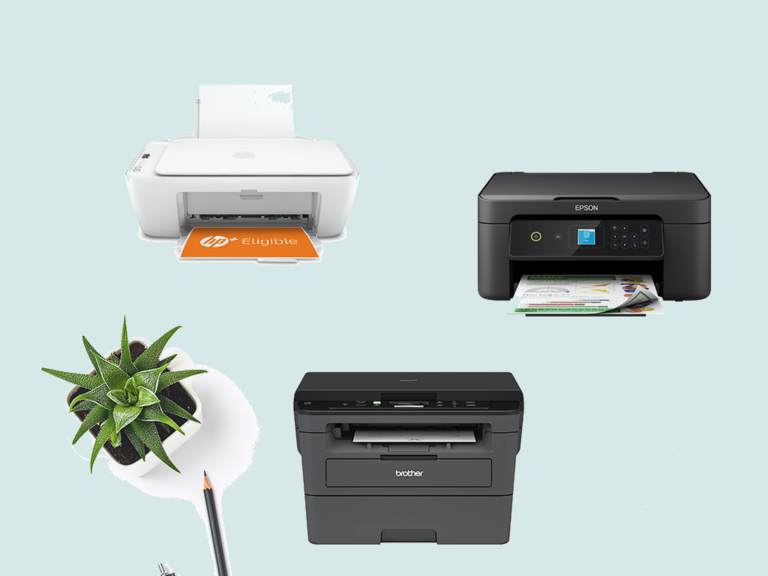
The HP DeskJet 2720e stands out as a versatile option for essential color printing needs, enhanced by intelligent features such as the HP+ system. It caters to users seeking not only basic color document printing but also prioritizing smart functionalities for increased security and productivity.
On the other hand, the Brother DCP-L2530DW takes the spotlight for its exceptional value proposition, delivering cost-efficient prints and swift performance. With optional 3,000 page high-yield toners, it provides an attractive option for those looking to minimize running costs per page, making it an ideal choice for users who prioritize budget-friendly yet high-quality printing.
Meanwhile, the Epson Expression XP-3205 adds a touch of style to functionality, offering a sleek design along with affordable printing solutions. With flexible wireless printing options, users can seamlessly print, scan, and copy from various devices. The inclusion of a four-color Pineapple 604 ink set further enhances the overall print quality, providing reliable and clear prints while minimizing overall printing costs.
Please share your comments and experiences with us 👇
How We Test
In conducting our comprehensive testing of the HP DeskJet 2720e, Brother DCP-L2530DW, and Epson Expression XP-3205 printers, our primary focus was to navigate through the core functionalities that define their performance. This rigorous evaluation aimed to provide users with a nuanced understanding of how these printers operate in real-world scenarios, helping them make informed decisions based on their priorities and preferences.
Testing Approach:
-
Basic Color Printing Proficiency: In-depth analysis of each printer’s ability to produce high-quality basic color prints, including documents such as recipes, forms, and travel papers.
-
All-In-One Functionalities: Rigorous examination of the all-in-one functionalities, emphasizing printing, copying, and scanning to ensure versatility and reliability in daily tasks.
-
Wireless and Mobile Printing: Thorough assessment of wireless and mobile printing options, focusing on connectivity, range, and reliability. Specific attention given to dual-band Wi-Fi capabilities and self-reset features where applicable.
-
Smart Printing Systems: Evaluation of smart printing systems, such as HP+’s forward-thinking capabilities, to understand their impact on security, productivity, and overall readiness.
-
Ease of Setup: Practical trials to assess the ease of setup using manufacturer-specific apps, ensuring a seamless initiation process on various devices.
Through our meticulous testing process, we aimed to provide users with valuable insights into the core functionalities of these leading printers. This exploration into their real-world performance will empower users to make well-informed decisions, aligning their printer choice with their unique requirements and preferences.
FAQs
Q1. Can I print from my smartphone or tablet?
Yes, many modern home printers offer wireless connectivity options such as Wi-Fi and Bluetooth, enabling you to print directly from your smartphone, tablet, or other mobile devices. All above recommended printers support WI-FI.
Q2. Can I use third-party ink or toner cartridges for my home printer?
While some printers may accept third-party cartridges, it is essential to check the manufacturer’s compatibility guidelines. I strongly discourage you from using non-genuine cartridges may affect print quality and could void the printer’s warranty.
Q3. Can I print photos at home with good quality?
Yes, modern inkjet printers such as the above HP 26K72B and Epson XP-3205 can produce high-quality photo prints at home. Printing photos at home is a convenient and cost-effective option for personal projects and family memories.
Q4. What is print resolution?
Print resolution refers to the level of detail or sharpness in a printed image or document. It is usually measured in dots per inch (DPI) and represents the number of individual ink dots or toner particles that can be placed within a one-inch square on the paper.
Q5. What resolution is recommended for photo printing?
For high-quality photo prints, a resolution between 300 to 600 DPI is generally recommended. This range ensures detailed and vibrant photo reproduction with excellent colour accuracy. Of course. You have the option to go higher.
Q6. Does print resolution affect printing speed?
Yes, higher print resolutions require the printer to produce more ink dots or toner particles per inch, which can slow down the printing process. Printers (such as the above) usually offer a range of resolution options, allowing users to balance quality and speed based on their specific printing needs.
Q7. Can I use my old HP 302 Ink with the above printer
No, you can’t. Every printer has its own special ink cartridge.