
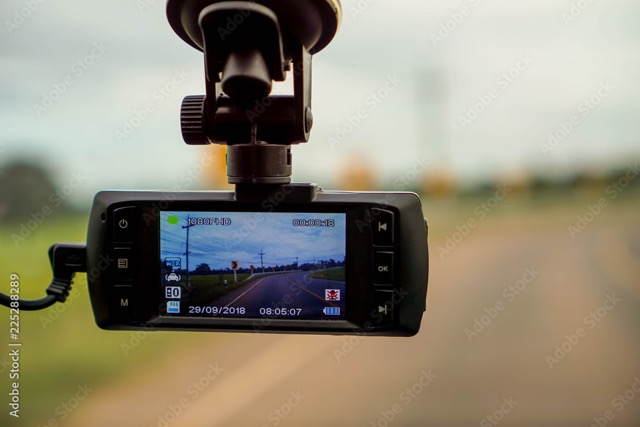
Why Dash Cams Matter
After years of driving across Britain—through congested city streets, unpredictable motorways, and tight rural lanes—I’ve seen firsthand how a dash cam can turn a stressful situation into a straightforward one. When an accident happens, clear video evidence can save hours of argument and thousands of pounds in claims. It’s not just about recording; it’s about protecting yourself, your passengers, and your peace of mind.
I’ve tested and worked with countless dash cams over the years, and I know what separates a reliable device from a gimmick. In this guide, I’ll share five models that consistently deliver where it matters: clarity, durability, and ease of use. These aren’t random picks—they’re cameras that have proven themselves on the roads, across different budgets and driving styles. Alongside the reviews, you’ll find a comparison table, a buying guide, and practical setup tips to help you choose confidently and get the most out of your investment.
My Top 5 Dash Cams (Tested & Trusted)
GKU D600Pro 4K Dash Cam Front and Rear (Best‑Seller Dual Channel)
When I first installed the GKU D600Pro, the difference was immediate. The front camera delivers true 4K clarity, while the rear captures 1080P detail, giving you a complete picture of what’s happening around your car. The 170° wide-angle lens and F1.8 aperture mean even tight streets and dimly lit roads are covered, and thanks to WDR night vision, the footage remains sharp when the sun goes down.
What really impressed me was the 5 GHz Wi-Fi connection—it’s fast, noticeably faster than the usual 2.4 GHz cams I’ve tested. Pairing with the app is smooth, and downloading clips doesn’t feel like a chore. Add to that the built-in GPS, which logs your speed and route automatically, and you’ve got a dash cam that feels genuinely smart, not gimmicky.
The design is compact and thoughtful: a 1.47-inch display for quick status checks, a sleek body that doesn’t block your view, and adjustable mounts that make installation painless. The rear camera even rotates 360°, which is a lifesaver for hatchbacks or tricky angles.
In daily use, the loop recording and G-sensor work exactly as they should—old files overwrite seamlessly, and any sudden impact locks the clip instantly. The included 64GB card gets you started, but if you drive often, upgrade to a high-endurance 256GB microSD for peace of mind. Parking mode is another highlight: with a hardwire kit, the GKU keeps watch even when you’re away, and the time-lapse feature saves power while still recording.
Voice prompts are a nice touch too. Instead of guessing what’s happening, the camera tells you—whether it’s starting, stopping, or locking a video after a collision. It’s small details like this that make the GKU feel polished.

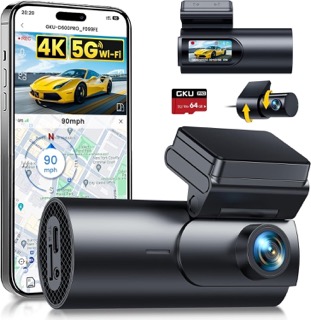
Ultra HD Recording: 4K front + 1080P rear, 170° wide-angle, F1.8 aperture, WDR night vision
Fast Connectivity: Built-in 5 GHz Wi-Fi (4× faster than 2.4 GHz) + GPS for speed/location logging
Compact Design: 1.47″ display, Type-C interface, adjustable front (120°) and rear (360°) cameras
Smart Recording: Seamless loop recording, G-sensor auto-lock, supports up to 256GB microSD (64GB included)
Parking Protection: 24H parking monitor + time-lapse mode (requires hardwire kit)
Voice Prompts: Status alerts and collision notifications; adjustable or disable option
GKU D600Pro 4K Dash Cam Verdict
Drivers wanting dual‑channel evidence (roundabouts, rear impacts, parking scrapes) with strong value.
iZEEKER 2.5K (1440p) Single‑Cam (High‑Value Budget Pick)
The first thing you notice about the iZEEKER dash cam is the jump in clarity. Recording at 2.5K QHD (2560×1440P), it’s twice the resolution of a standard 1080P cam, and that difference shows when you’re reviewing footage—number plates and road signs are sharper, even at speed. The 170° wide-angle lens ensures you’re not missing anything on multi-lane roads, and the 3-inch IPS display makes checking settings or replaying clips effortless, even while parked.
What really stands out is how practical this camera feels for everyday use. It powers up automatically when you start the car and shuts down when you turn it off—no fiddling required. The loop recording system is smart too: it overwrites old files without touching locked videos, so you never run out of space unexpectedly. And if something happens—a sudden jolt or impact—the built-in G-sensor locks the clip instantly. You can even manually lock a video with a button press if you spot something worth saving.
Night driving? The iZEEKER handles it well for its price bracket. Thanks to an f/1.8 aperture and WDR technology, it adjusts exposure intelligently, so plates and signs remain visible under streetlights or in dim conditions. It’s not a specialist night-vision device, but for daily driving, it’s more than enough.
Parking protection is available too. With a hardwire kit, the dash cam wakes up when it detects vibration and records until the event ends—ideal for safeguarding your car overnight. And the detachable charger design is a thoughtful touch: if your cigarette lighter is occupied or missing, you still have options to power the device.

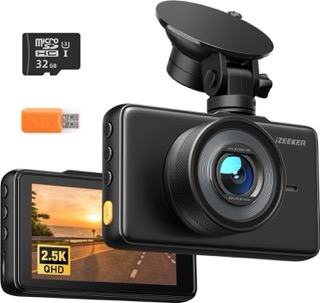
Resolution: 2.5K QHD (2560×1440P)
Display: 3″ IPS screen
Lens: 170° wide-angle
Parking Mode: Yes (requires hardwire kit)
G-Sensor: Yes
SD Card: Included (supports loop recording)
Extras: WDR night vision, auto start/stop, manual lock button
iZEEKER 2.5K Dash Cam
Drivers who want a simple, budget‑friendly front camera with clearer plates than 1080p.
ORSKEY Dash Cam
If you’re looking for a dash cam that covers both ends of your car without breaking the bank, the ORSKEY S900 is a solid choice. It records in Full HD 1080P on both the front and rear cameras, giving you a clear view of the road ahead and what’s happening behind. The 170° wide-angle lens ensures you capture more than just your lane, which is essential for roundabouts and multi-lane traffic.
One of the standout features is its Sony sensor combined with an F1.8 aperture and six-element glass lens. This combination delivers impressive night vision for its price range—plates and road signs remain visible even in low-light conditions. It’s not just marketing; in real-world use, the night footage is noticeably sharper than many budget rivals.
The ORSKEY S900 runs on a high-performance chip, which keeps recordings smooth at 1080P/30fps. That means no frustrating frame drops when you need evidence most. It also packs all the essentials: loop recording, G-sensor impact detection, parking monitoring, and motion detection. These features work quietly in the background, so you don’t have to think about them—just drive.
And here’s a bonus: ORSKEY includes a 32GB microSD card in the box, so you can start recording straight away. For a budget-friendly dual-channel setup, that’s a welcome touch. Plus, the brand backs the product with a 12-month guarantee and responsive customer support, which adds peace of mind.

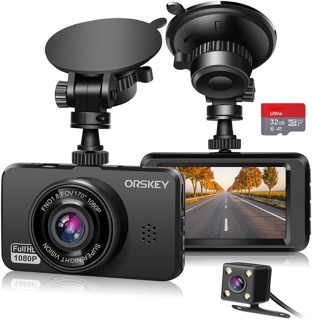
Resolution: 1080P Full HD (front & rear)
Lens: 170° wide-angle
Sensor: Sony sensor + F1.8 aperture
Parking Mode: Yes
SD Card: 32GB included (supports up to 32GB)
Extras: Loop recording, G-sensor, HDR, motion detection
ORSKEY Dash Cam Verdict
Anyone wanting basic protection at the lowest cost—ideal for first‑time buyers or secondary cars.
Nextbase 222XR (Dual 1080p from a Trusted Brand)
The Nextbase 222XR feels like a dash cam designed for drivers who value simplicity and reliability. Recording at 1080P HD on the front camera and 720P HD on the rear, it delivers clear, detailed footage for everyday driving and insurance claims. The 140° wide viewing angle ensures you capture more of the road ahead, while the rear camera discreetly doubles your protection without cluttering your windscreen.
One of the clever touches is the Click&Go Pro powered mount. Instead of wrestling with cables every time you remove the camera, the power runs through the mount itself. Just click the dash cam in, and it’s ready to go—no dangling wires, no fuss. It’s a small detail that makes a big difference if you regularly take the camera out for security.
The 2.5-inch IPS screen is bright and sharp, making it easy to review footage or check settings on the go. And when your car is parked, the Intelligent Parking Mode kicks in, recording any bumps or movement around your vehicle. It’s reassuring to know your car isn’t left unprotected.
In short, the Nextbase 222XR combines practical features with a polished design. It’s not about flashy extras—it’s about doing the essentials well and making ownership easy.

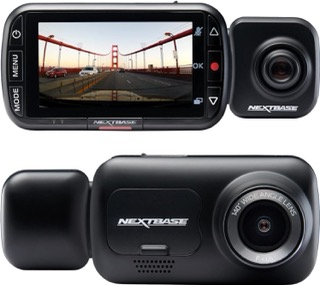
Resolution: Front 1080P @30fps | Rear 720P
Viewing Angle: 140°
Display: 2.5″ IPS screen
Mount: Click&Go Pro powered magnetic mount
Parking Mode: Yes (Intelligent)
SD Card: Not included (supports up to 128GB)
Nextbase 222x Dash Cam Verdict
Drivers who value brand support and dual‑channel coverage with simple ownership.
BOTSLAB 4K + 2K Rear (Feature‑Rich Dual‑Channel)
The BOTSLAB dash cam feels like a serious upgrade the moment you start using it. The front camera records in true 4K, while the rear camera captures crisp 2K footage, providing exceptional clarity from every angle. Thanks to the STARVIS sensor and a six-layer optical lens, even fine details like license plates at a distance remain sharp. The wide coverage—170° front and 150° rear—means blind spots are practically eliminated, which is a big deal on busy roads.
What sets BOTSLAB apart is its combination of advanced tech and thoughtful design. The built-in GPS logs your speed, location, and route automatically, while 5.8GHz Wi-Fi makes transferring clips to your phone fast and painless. No waiting around for huge 4K files to crawl across a slow connection—this feels modern and efficient.
Night driving is where BOTSLAB really shines. The F1.5 aperture and STARVIS sensor boost exposure in low light, so plates and signs stay visible even on dark rural roads. And if something goes wrong, the G-sensor triggers emergency recording instantly, locking the footage for evidence.
Then there’s ADAS (Advanced Driver Assistance System)—a feature you don’t often see at this price point. It gives lane departure alerts, warns if you’re too close to another vehicle, and even reminds you to take a break every two hours. It’s like having a quiet co-pilot looking out for you.
For long-term reliability, BOTSLAB uses a supercapacitor instead of a lithium battery, so it handles extreme temperatures better and lasts longer. Pair it with a hardwire kit, and you get true 24/7 parking monitoring, keeping your car protected day and night.


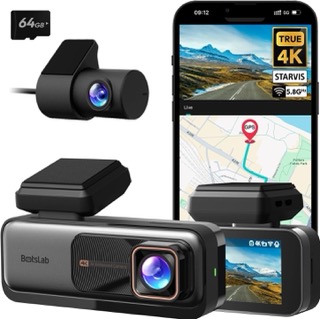
Resolution: Front 4K | Rear 2K
Lens: 170° front, 150° rear
Sensor: STARVIS + F1.5 aperture
GPS: Yes
Wi-Fi: Yes (5.8GHz)
Parking Mode: Yes (with hardwire kit)
Extras: ADAS (Advance Driver-Assistance System) alerts, supercapacitor, app control
Dash Cam Features (What Actually Matters Day‑to‑Day)
Resolution & Sensor Quality
- 1440p (2.5K) is a great budget sweet spot (e.g., iZEEKER), delivering clearer plates than 1080p without the heavy storage footprint of 4K.
- 4K excels for plate capture at speed and detail in complex scenes. Pair it with high‑endurance microSD and regular in‑camera formatting.
- For night driving, look for cameras mentioning STARVIS or enhanced HDR/WDR—e.g., BOTSLAB, Vantrue.
Field of View (FOV)
- A wider FOV captures more lanes and side events—a big plus in urban traffic—but very wide angles can introduce edge distortion. Pick a sensible balance that suits your routes.
Dual/Triple Channels
- Front‑only keeps costs and wiring down.
- Front + rear covers the most common collision scenarios and parking scrapes (e.g., GKU 4K dual, BOTSLAB, Nextbase 222XR).
Parking Mode
- Crucial for street parking. Budget best-sellers (GKU, BOTSLAB, Nextbase) include a G-sensor or motion-triggered parking mode. For 24/7 reliability, consider hardwiring with a low‑voltage protector
GPS & Speed Stamping
- Useful for location/time/speed evidence. Nextbase and BOTSLAB offer GPS options and app workflows to export clips with metadata, which aids in claims or evidence preparation.
Connectivity & App Experience
- Wi‑Fi/Bluetooth speed up transfers and firmware updates. Premium ecosystems like Nextbase tend to offer polished apps and easy accessories.
Emergency & Safety Extras
- Emergency SOS (Nextbase) can share your location and medical profile after severe incidents.
Dash Cam Comparison Table
| Model | Resolution | Channels | Lens Angle | GPS | Wi-Fi | Parking Mode | SD Card | Key Features |
|---|---|---|---|---|---|---|---|---|
| GKU D600Pro | Front 4K (2160p) + Rear 1080p | Dual | 170° front / 360° rear adjustable | Yes | Yes (5 GHz) | Yes (with hardwire kit) | 64GB included (up to 256GB) | WDR night vision, voice prompts, time-lapse, GPS logging |
| iZEEKER 2.5K | Front 2.5K QHD (2560×1440P) | Single | 170° front | No | No | Yes (with hardwire kit) | MicroSD included | 3″ IPS screen, WDR, auto start/stop, manual lock button |
| ORSKEY S900 | Front 1080p + Rear 1080p | Dual | 170° front / rear | No | No | Yes | 32GB included | Sony sensor, F1.8 aperture, HDR, motion detection |
| Nextbase 222XR | Front 1080p + Rear 720p | Dual | 140° front | No | Yes | Yes (Intelligent) | Not included | Click&Go Pro mount, 2.5″ IPS screen, easy rear install |
| BOTSLAB 4K + 2K | Front 4K + Rear 2K | Dual | 170° front / 150° rear | Yes | Yes (5.8 GHz) | Yes (with hardwire kit) | 64GB included | STARVIS sensor, ADAS alerts, supercapacitor, app control |
Set‑Up & Maintenance (Step‑By‑Step for Drivers)
- Mounting: Place the front cam behind the rear‑view mirror (high on the windscreen) to keep it discreet and within guidelines.
- Power: Start with the 12V socket; if you need reliable parking mode, install a hardwire kit with low‑voltage protection.
- Rear camera: Route the cable along the headliner, down the boot trim, leaving slack for hatchbacks.
- Storage: Use U3/V30 high‑endurance microSD—128GB for 1440p single; 256GB for 4K dual/triple channels. Bundle cards (e.g., 64GB) are fine to begin, but upgrade for daily use.
- Firmware & app: Update via the brand’s app (MyNextbase or included brand app) for stability and features; check settings for G-sensor sensitivity, loop length, and parking mode triggers.
- Monthly routine: Format the card in‑camera, clean the lens, and check cable strain (use interior clips to avoid rubbing).
- Incident workflow: Lock the file on the camera after an incident; export with GPS/time data. Nextbase Emergency SOS can assist in severe cases.
Dash Cam Buying Guide
1) Choose channels based on your driving:
- Single (front‑only) for simplicity/price (e.g., ORSKEY, iZEEKER).
- Dual (front + rear) for fuller evidence (e.g., GKU dual, BOTSLAB, Nextbase 222XR).
2) Pick the right resolution:
- 1440p/2.5K balances clarity and storage.
- 4K delivers maximum plate detail—pair it with high‑endurance microSD.
3) Prioritise parking mode if you street‑park:
- Ensure your model supports motion/G‑sensor parking recording; use hardwire/OBD for constant power.
4) Think about app experience & accessories:
- Nextbase offers polished apps and accessories; BOTSLAB/GKU is value-driven with workable apps.
5) Storage & maintenance:
- Format monthly, replace cards proactively if errors appear, and keep the lens clean.
Which Dash Cam Should You Buy? (Quick Verdict)
- Best All-Rounder for Drivers:
GKU D600Pro — If you want 4K clarity, GPS, fast Wi-Fi, and full front/rear coverage without paying flagship prices, this is the most balanced choice. - Best Budget Single-Cam:
iZEEKER 2.5K — Delivers sharper-than-HD video, simple setup, and reliable features for everyday driving at a very accessible price. - Best Budget Dual-Cam:
ORSKEY S900 — Affordable front and rear protection, decent night vision, and includes a 32GB card so you’re ready to go out of the box. - Best for Brand Trust & Ease of Use:
Nextbase 222XR — A household name with a smart magnetic mount, dual coverage, and Intelligent Parking Mode. Ideal if you value a polished ecosystem. - Best Premium Choice:
BOTSLAB 4K + 2K — For drivers who want top-tier resolution, ADAS safety alerts, GPS, and 24/7 parking monitoring with long-term durability.
FAQS
Do I need a dash cam?
While not legally required, a dash cam is highly recommended. It provides clear evidence in case of accidents, helps resolve insurance claims faster, and can protect you from fraudulent “crash for cash” scams.
Will a dash cam lower my insurance premium?
Some insurers offer discounts or simplified claims for dash cam users. Even if your insurer doesn’t, having video evidence can help prevent costly disputes and expedite claim processing.
Is it legal to use a dash cam in the UK?
Yes, dash cams are legal in the UK. However, you must ensure they do not obstruct your view and comply with GDPR if you share footage publicly. For personal use, recording public roads is permitted.
What resolution should I choose for a dash cam?
For most drivers, 1440p (2.5K) offers a great balance of clarity and storage efficiency. If you want maximum detail for number plates at speed, go for 4K—but pair it with a high-endurance microSD card.
Do I need a dual-channel dash cam?
If you want coverage for both front and rear incidents (e.g., rear-end collisions or parking scrapes), a dual-channel dash cam is a worthwhile investment. A single-channel system is fine for basic protection, but a dual-channel system adds peace of mind.
How do I power a dash cam for parking mode?
Parking mode requires constant power. You can use a hardwire kit connected to your fuse box with low-voltage protection
What size memory card do I need?
For 1080p or 1440p, a 128GB high-endurance microSD is ideal. For 4K dual-channel, go for 256GB. Always choose high-endurance cards designed for continuous recording.
Can I submit dash cam footage to the police?
Yes. In the UK, you can use the National Dash Cam Safety Portal to report dangerous driving. Many police forces accept dash cam evidence for investigations.