

If you’ve recently made the jump to the MacBook Neo, you may already be discovering just how capable Apple’s latest laptop really is—yet also wondering how to get the most out of it when life pulls you between work, travel, and everything in between. I remember unboxing mine and realising that although the machine itself was superbly engineered, the real transformation came from pairing it with the right accessories. The subtle improvements—better ergonomics, smarter charging, cleaner cable management—made a far bigger difference to my daily comfort than I expected.
After testing countless accessories over the years—some brilliant, some forgettable, and the occasional hidden gem—I’ve put together this MacBook Neo accessories guide to help you separate the useful from the unnecessary. Think of it as a curated shortlist of add‑ons that genuinely elevate your setup, reduce clutter, and make the MacBook Neo feel even more at home in your work‑and‑travel routine.
What Exactly Is a MacBook Neo Accessory?
A MacBook Neo accessory is any add-on that enhances the laptop’s functionality, protection, or ergonomics. That might be something practical—like a hub that brings back familiar ports—or something comfort-focused, such as a laptop stand that stops your shoulders from tightening after hours of typing.
Accessories can range from simple carry sleeves to advanced Thunderbolt docks and noise-reducing Bluetooth earphones. In everyday use, they help you work more comfortably, connect more devices, or protect your investment from scratches and wear.
In the UK, space can be tight—many of us work from small flats, shared homes, or a corner of the kitchen table—so smart, compact accessories that don’t dominate your workspace can make all the difference. UK sockets, bag sizes, and commuting habits also influence what works best.
Key Features to Look For
Essential Features
- Sturdy build quality
Accessories take daily knocks—from backpacks, desks, and travel—so materials matter. - Portability
For commuters or students, lightweight gear makes the biggest difference. - Compatibility
Some accessories fit all laptops; others are designed specifically for the MacBook Neo’s profile. - Heat management
A stand or pad that improves airflow helps maintain smooth performance.
Advanced or Premium Features
- Thunderbolt 4 hubs with high-speed data transfer
Ideal for creatives who move large files or multiple displays. - Magnetic locking mechanisms
Offer quicker, cleaner attachment for chargers and stands. - Noise-optimised peripherals
Quiet keyboards, silent mice, and whisper‑calm fans help in shared UK spaces.
Optional Extras (Nice to Have)
- Adjustable stands
Handy if you shift between sitting and standing. - Multi‑device Bluetooth keyboards
Great for people managing tablets, phones, and work laptops. - Travel‑friendly organisers
Perfect for keeping cables tidy when hopping between co‑working spots.
The Best MacBook Neo Accessories You Can Buy
After testing a wide range of accessories, here are five products that consistently improve the MacBook Neo experience.
Satechi Thunderbolt 4 Dock
This dock feels reassuringly solid, and the weight keeps it planted on the desk. Day to day, I found it handles multiple displays and high‑speed drives without a hiccup. It runs cool under load, and the rear‑facing ports help keep UK desks much tidier.


SATECHI 5-in-1 Thunderbolt 4 Slim Hub Docking Station with 8K or Dual 4K Display, 60W PD Charging, Three Thunderbolt 4 Downstream Ports and USB 3.2 Gen 2 –...
Key Features
– Thunderbolt 4 ports
– Gigabit Ethernet
– Multiple USB‑A and USB‑C ports
– 4K/8K display support
Pros
– Feels stable and premium
– Excellent bandwidth for creatives
– Keeps desk cables organised
– Runs cooler than many hubs
– Smooth performance with external SSDs
Cons
– On the pricier side
– Requires its own power brick
– More ports than some users need
– Slightly bulky for travel
Also available from






Best For
Power users who want a proper desktop setup.
Check the latest price on Amazon.co.uk.
Twelve South Curve Flex Stand
The Curve Flex is one of those accessories that quietly improves everyday comfort. The adjustable tilt helps align the screen with your eyes, reducing neck strain. It folds surprisingly flat, making it easier to carry between home and office.

Twelve South Curve Flex | Ergonomic Height & Angle Adjustable Aluminum Laptop/MacBook Stand/Riser, fits 10"-17", folds flat for portability -travel pouch...
Key Features
– Adjustable height and angle
– Aluminium build
– Foldable design
Pros
– Eases shoulder tension
– Very stable even at full height
– Looks natural on any desk
– Excellent for video calls
Cons
– Not the cheapest stand
– Can wobble slightly on uneven surfaces
– Requires an external keyboard and mouse
Also available from


Best For
Anyone who works long hours at a laptop.
Check the latest price on Amazon.co.uk.
Native Union Stow Slim Sleeve
A slim, padded sleeve that feels carefully stitched rather than mass-produced. It slips effortlessly into backpacks and keeps the MacBook Neo well protected without bulk.

Native Union Stow Slim for MacBook Air 13” (2018 & Later)
Key Features
– Slim profile
– Soft internal lining
– Weather‑resistant materials
Pros
– Excellent for commuting
– Stylish without trying too hard
– Offers great scratch protection
Cons
– Limited storage for accessories
– Slightly snug fit until broken in
Also available from


Best For
Users who travel light but want solid protection.
Check the latest price on Amazon.co.uk.
Logitech MX Anywhere 3S
Small but surprisingly capable, this mouse glides smoothly even on glossy UK kitchen tables. The scroll wheel feels refined, and switching devices is effortless.

Logitech MX Anywhere 3S Compact Wireless Mouse, Fast Scrolling, 8K DPI Any-Surface Tracking, Quiet Clicks, Programmable Buttons, USB C, Bluetooth, Windows...
Key Features
– Silent buttons
– Multi‑device pairing
– USB‑C charging
Pros
– Ideal for small workspaces
– Quiet in shared environments
– Excellent battery life
– Compact but comfortable
Cons
– Small size won’t suit everyone
– No USB‑A dongle included
Also Available from


Best For
Mobile workers who hop between locations.
Check the latest price on Amazon.co.uk.
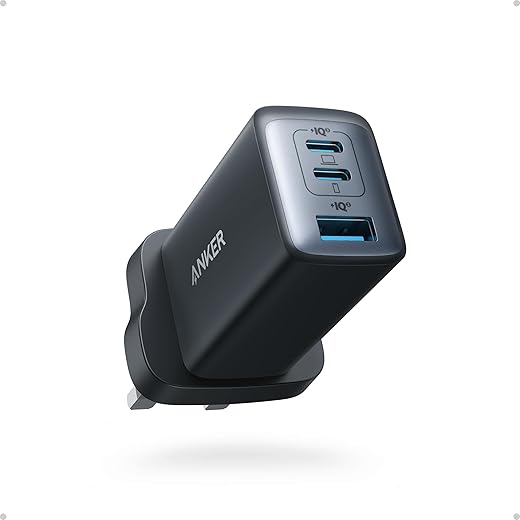
Anker Nano II 65W Charger
This compact charger is far smaller than the MacBook’s stock brick. It barely warms up during charging and fits easily in a pocket or organiser. Very suitable for travel.
Key Features
– 65W USB‑C output
– GaN technology
– Foldable prongs
Pros
– Saves weight in your bag
– Fast, reliable charging
– Stays cooler than typical chargers
Cons
– Two ports only
– Only works best with high-quality cables
Also Available from


Best For
Travellers and commuters.
Check the latest price on Amazon.co.uk.
How to Choose the Right MacBook Neo Accessories for You
If you prioritise comfort, start with a stand and external keyboard. If you’re short on ports, a dock or hub should top your list. Those working in small UK flats might prefer compact, foldable gear to keep the table usable for dinner. For travellers, weight matters more than anything—choose slim sleeves, compact chargers, and a mouse that fits neatly into side pockets.
Common Mistakes to Avoid
Don’t buy a stand that’s too tall for your workspace; some UK desks sit higher than average. Avoid cheap hubs that overheat, as they can throttle performance. Don’t assume your old chargers are compatible—voltage and wattage matter. And watch out for accessories that look great online but take up too much space in smaller rooms.
Maintenance, Safety, and Longevity Tips
Wipe stands and sleeves regularly—they collect dust that can transfer to your laptop’s fans. Check cables for fraying, especially if you coil them tightly for travel. Accessories like chargers and hubs can get warm; store them somewhere ventilated, not buried in drawers. If you use a laptop stand, make sure the MacBook Neo has enough airflow to stay cool.
Frequently Asked Questions
What accessories are essential for a MacBook Neo?
A stand, sleeve, and hub are the top three essentials for most users.
Do I need a Thunderbolt dock?
Not unless you use monitors, SSDs, or professional peripherals.
Which charger works best as a travel option?
Compact GaN chargers are ideal for fast charging without the bulk.
Are Bluetooth mice reliable with the MacBook Neo?
Yes—modern models connect quickly and stay stable.
Do I need a case as well as a sleeve?
Only if you carry your laptop without a bag or travel frequently.
Will using a stand help with posture?
Definitely—raising the screen can noticeably reduce neck and shoulder strain.
Final Verdict
The MacBook Neo is brilliant on its own, but the right accessories turn it into a workstation tailored to your routine. For most users, the Curve Flex stand, Satechi dock, and a slim sleeve offer the best blend of comfort and practicality. Travellers will get more benefit from the Anker Nano II and MX Anywhere 3S. Whatever you choose, aim for accessories that make your daily setup smoother and more enjoyable rather than adding unnecessary clutter.