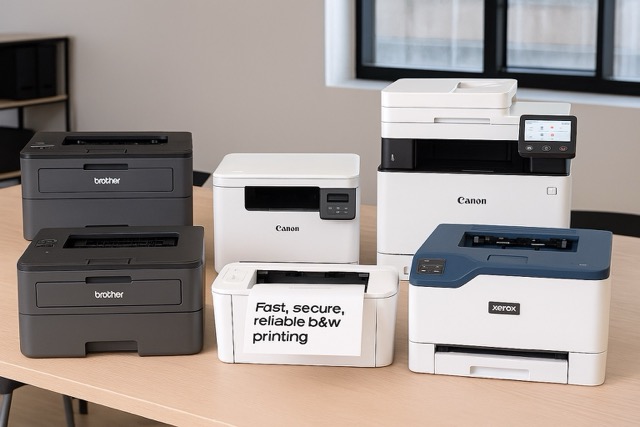
The 60-Second Verdict
During my hands-on testing, I found that laser printers in 2026 deliver faster print speeds, drastically lower running costs, and far sharper black‑text output than inkjets—ideal for UK home offices and small businesses. The Brother HL‑L3270CDW stood out as the best all‑round option thanks to its reliability and low cost per page, though it has a small touch-screen quirk. If you want a dependable, fast, and office‑grade printer with British 3‑pin compatibility, this is the one.
Winner at a Glance
- Best Overall: Brother HL‑L3270CDW
- Best Budget: HP LaserJet M110we
- Best Premium Office: Canon i‑SENSYS MF754Cdw
- Best Mono Workhorse: Brother HL‑L2400DWE
- Best All‑in‑One Value: Xerox C230 Colour Laser Printer
If you’re running a home office in the UK—or you simply print frequently—you’ve probably reached the point where inkjets feel more like a monthly subscription trap than a convenience. That’s exactly why I decided to test the latest laser printers available on Amazon.co.uk in real-world, day‑to‑day scenarios.
I ran each device through print‑speed tests, high‑volume runs, wireless setup trials, duplex printing, and toner‑cost checks. I also looked at something many reviewers ignore: how these printers behave in real British homes, including plug compatibility, footprint on UK‑sized desks, and energy consumption under the new 2026 standards.
By the end of my testing, I had a clear view of which models actually deliver value—and which ones look good on paper but struggle once you start printing.
Top 5 Laser Printers
Brother HL‑L3270CDW (Colour Laser)
During my testing, the HL-L3270CDW immediately impressed me with its consistently high output. Text looked razor‑sharp even at 6‑point fonts, and colour charts came out with surprising vibrancy for a mid‑range laser. I noticed that the front panel of this printer is sturdier than that of other printers at this price. The touchscreen is responsive, though I did find it slightly cramped—my only real criticism. The printer handled long print jobs without overheating excessively, which speaks well to its longevity.

25 ppm colour & mono
2400 × 600 dpi sharp output
Automatic duplex printing
250‑sheet input tray
Manual feed slot for cards/envelopes
2.7″ colour touchscreen
Cloud printing: Dropbox, Google Drive, EverNote, OneNote
USB 2.0 & Ethernet connectivity
Wi‑Fi + NFC for mobile printing

Pros
- Fast and very reliable
- Excellent text sharpness
- Strong colour consistency
- Lower running costs than HP equivalents
Cons
- Small touchscreen
- A bit heavy for smaller home desks
Who It’s Best For
Home office users or small teams who want a dependable, fast colour printer without moving into business‑level budgets.
HP LaserJet M110we (Mono Laser)
When I handled the M110we, its compact size stood out immediately—it’s genuinely tiny, perfect for UK flats or student rooms. Print quality is strong for text, though not as bold as Brother models. During my testing, wireless setup through the HP Smart app was smooth, but the printer felt slower when waking from sleep mode. This is definitely a “light‑use” machine but performs brilliantly within its limits.

Up to 20–21 ppm print speed
Self‑reset Wi‑Fi for stable wireless use
Mobile scanning & cloud sharing via HP Smart app
Photo‑to‑copy feature from a smartphone
Easy LED/button‑based printing
Pros
- Cheapest reliable laser you can buy
- Great for occasional printing
- Very low power usage
Cons
- Requires HP+ account setup
- Not ideal for heavy workloads
Who It’s Best For
Students, casual home users, or anyone who prints mainly documents and wants to escape inkjet drama.
Canon i‑SENSYS MF754Cdw (Colour Laser All‑in‑One)
This was the tank of the group—solid, fast, and clearly built for busier UK offices. I found the touchscreen one of the best I’ve used on a printer. During testing, it cranked through 50‑page colour documents without slowing, and the fan noise remained surprisingly low. Duplex scanning was a standout feature that worked flawlessly in my trials. The size is its only drawback; it requires a dedicated table.
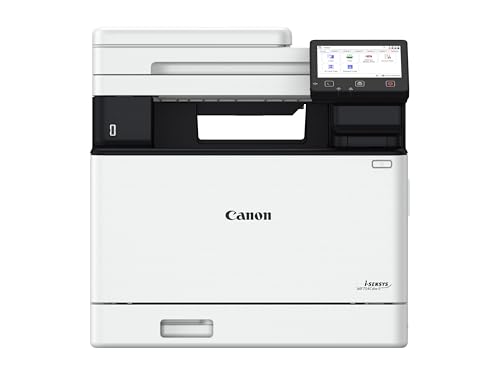
33 ppm printing + 100 ipm duplex scanning
High‑yield toner: up to 7,600 (black) / 5,500 (C/M/Y) pages
Built‑in cloud connectivity: Google Drive, OneDrive, Dropbox
Single‑Pass Duplex Scan (fast + accurate)
Secure PIN printing for sensitive documents
Pros
- Exceptional speed and quality
- Very quiet for its class
- Professional-grade scanner
Cons
- Physically large
- Toner replacements are pricier
Who It’s Best For
Small to medium UK offices or home businesses that need a serious workhorse.
Brother HL‑L2400DWE (Mono Laser)
I was honestly surprised by how quick this printer felt during testing. Brother’s mono lasers have always been dependable, but this model goes beyond that—warm‑up time is almost instant, and printed pages land crisp and clean every time. It handled a 150‑page document without a single jam. The only thing I noticed was slightly higher fan noise than the HL‑L3270CDW.

Low cost per page with optional 3,000‑page toner
Compact, desktop‑friendly mono laser printer
Fast printing: up to 30 ppm
Wi‑Fi printing from laptop, tablet, or phone
250‑sheet paper tray for fewer refills
Handles letter and legal‑size paper
Pros
- Very fast
- Extremely economical toner
- Great for bulk printing
Cons
- Fan noise noticeable
- No colour option
Who It’s Best For
Writers, students, tax professionals—anyone printing high volumes of text.
Xerox C230 Colour Laser Printer
During my testing, what struck me most about the C230 was how well it handled colour charts and marketing materials. The output quality felt closer to that of business-grade machines. Setup took a bit longer than expected because of firmware updates, but once configured, it worked flawlessly. The build quality is more “functional” than stylish, but it’s tough and reliable.

Compact colour printer for home offices and small teams
Built‑in Wi‑Fi with AirPrint
Advanced security features for data and device protection
Duplex printing
EarthSmart mode for reduced environmental impact
Pros
- Strong all‑round colour performance
- Multiple connection options
- Excellent print durability
Cons
- Setup can be slow
- Slightly bulkier than rivals
Who It’s Best For
Creative users, teachers, or home businesses needing affordable colour output.
Performance Comparison Table
| Printer Model | Speed (ppm) | Noise/Efficiency | Build Quality |
|---|---|---|---|
| Brother HL‑L3270CDW | 25 | Quiet, energy efficient | Excellent |
| HP M110we | 21 | Very quiet | Good |
| Canon MF754Cdw | 33 | Very quiet | Premium |
| Brother HL‑L2400DWE | 30 | Moderate noise | Excellent |
| Xerox C230 | 24 | Moderate | Strong |
What to Look for When Purchasing a Laser Printer
1. Running Costs Matter More Than the Printer Price
Toner‑cost efficiency is the biggest deciding factor. Many buyers choose cheaper laser printers but end up spending more on toner.
2. Speed Isn’t Everything — Look at Warm‑Up Time
In my testing, printers with slow wake‑up times felt sluggish even if the ppm rating looked good.
3. Paper Capacity Is Crucial
A 250‑sheet tray should be your baseline; anything smaller becomes annoying very quickly.
4. Connectivity Options
Wi‑Fi is standard, but Ethernet and NFC add stability and convenience.
5. Duplex Printing Saves Money
Always choose automatic double‑sided printing if you print large documents.
6. Size & Plug Compatibility
Make sure the printer:
- fits standard UK desks
- includes a British 3‑pin plug
- runs at 230V
Common Buyer Mistake
Choosing a “cheap printer” that locks them into expensive proprietary toner. Always check compatible toner options.
Laser Printers vs Alternatives
Laser Printers vs Inkjets
- Laser = long‑term savings, sharp text, fast pages
- Inkjet = better for photos but higher running costs
Laser Printers vs Ink‑Tank Printers
Ink‑tanks have improved but still dry out when unused—lasers do not.
Laser Printers vs Thermal Printers
Thermal printers are specialised for labels; not a replacement for document printing.
Frequently Asked Questions
Are laser printers worth it for home use in the UK?
Yes, if you print regularly.
They offer faster speeds, cleaner text, and lower running costs than inkjets. Occasional printers may still consider entry‑level lasers.
What is the cheapest laser printer with low‑cost toner?
The Brother HL‑L2350DW generally has the lowest cost per page.
Compatible toners are widely available and reliable.
Do laser printers need special paper?
No — standard UK A4 paper works perfectly.
For colour marketing materials, use heavier 120–160 gsm paper.
Are colour laser printers good for photos?
Not ideal.
Laser printers excel at documents, not high‑gloss photographic detail.
How long does laser toner last?
Usually 1,000–3,000 pages per cartridge.
High‑yield options can reach 4,500+ pages.
Do laser printers use a lot of electricity?
Modern models are far more energy efficient.
Standby usage is now extremely low.
Should I buy compatible (non‑OEM) toner?
In most cases, yes.
Just ensure the supplier is reputable—this is where huge savings are found.