
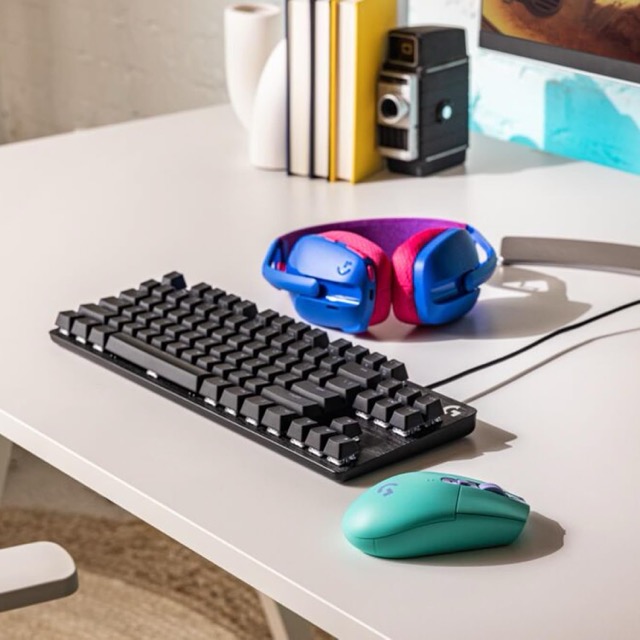
If you’ve been searching for a solid mechanical Gaming keyboard that doesn’t feel overpriced, chances are you’ve come across the Logitech G413 TKL SE. Recently, it’s been popping up more often in Google searches, deal pages, and recommendation threads — and that raises a fair question: why this keyboard, and why now?
The short answer is value. The longer answer is about build quality, simplicity, and timing. Let’s break down what’s driving the interest and whether the G413 TKL SE genuinely deserves the attention.
A Shift Towards Practical, No-Nonsense Keyboards
Over the past couple of years, many buyers have become more selective. Flashy RGB effects and premium price tags are no longer automatic selling points. Instead, people are asking more grounded questions:
- Will it last?
- Is it comfortable for long sessions?
- Does it offer good typing and gaming performance for the price?
The Logitech G413 TKL SE fits neatly into this mindset. It strips things back to the essentials and focuses on function over spectacle, which is exactly what many users are now looking for.

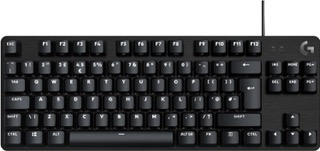
Tenkeyless (TKL) compact layout
Tactile mechanical switches
Aluminium top plate
Durable PBT keycaps
White backlighting
Plug-and-play setup
Suitable for work and gaming
Why “Logitech G413 TKL SE Keyboard” Is Gaining Popularity
The tenkeyless (TKL) layout is a big part of the keyboard’s appeal. By removing the number pad, Logitech has created a more compact design that offers real, everyday benefits:
- More desk space for mouse movement
- Less shoulder and wrist strain during long sessions
- Easier positioning for ergonomic setups
For gamers, this layout allows freer mouse movement. For home workers and students, it creates a cleaner, less cluttered workspace. As people become more aware of comfort and posture, TKL keyboards are seeing a natural rise in demand — and the G413 TKL SE is one of the more affordable, recognisable options.
Build Quality That Punches Above Its Price
One of the main reasons this keyboard is trending is word of mouth around its build quality.
Unlike many budget mechanical keyboards that feel lightweight or plasticky, the G413 TKL SE features:
- A solid aluminium top plate
- PBT keycaps, which resist shine and wear better than standard ABS
- A reassuringly stable feel on the desk
This gives it a durability advantage that people don’t always expect at this price point. Buyers searching for “value mechanical keyboard” often land on the G413 TKL SE because it feels closer to mid-range hardware than entry-level gear.
Mechanical Switches Without the Noise Overload
The keyboard uses tactile mechanical switches, designed to offer clear feedback without being excessively loud. This makes it suitable for:
- Gaming
- Typing
- Shared spaces or home offices
While it won’t replace a custom mechanical keyboard for enthusiasts, it strikes a sensible balance for people who want mechanical performance without the learning curve or noise concerns.
This practical approach appeals to first-time mechanical keyboard buyers — another reason search interest continues to grow.
The Logitech Effect: Brand Trust Still Matters
Logitech’s reputation plays a quiet but important role here. When buyers compare unknown brands to a familiar name, many lean towards the option that feels safer.
Search behaviour often reflects this:
- People look up the model name before buying
- They check reviews, alternatives, and long-term reliability
- They want reassurance they’re not making a risky purchase
The G413 TKL SE benefits from this trust, especially among buyers who don’t want to experiment with lesser-known manufacturers.
Who the G413 TKL SE Is Really For
This keyboard isn’t trying to be everything to everyone, and that’s part of its strength.
It’s a good fit if you:
- Want a reliable mechanical keyboard without paying premium prices
- Prefer a clean, minimal design
- Use your keyboard for both work and gaming
- Care about durability more than RGB lighting
It may not suit you if you:
- Want extensive customisation
- Prefer ultra-light or linear switches
- Expect advanced software features
Logitech G413 TKL SE vs Top Alternatives
While the Logitech G413 TKL SE offers strong value, it’s not the only tenkeyless mechanical keyboard worth considering. Here’s how it compares with a few popular alternatives in a similar price and performance range.
Logitech G413 TKL SE vs Keychron C1
The Keychron C1 is often recommended for users who prefer a more customisable typing experience.
- Keychron C1 strengths:
Hot-swappable switches, Mac/Windows compatibility, cleaner typing feel - G413 TKL SE strengths:
Better out-of-the-box durability, stronger brand support, PBT keycaps

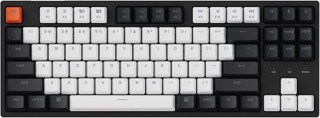
Tenkeyless (87-key) compact layout
USB-C wired connection with detachable cable
Mac-optimised layout with Windows compatibility
Adjustable typing angle with two-level feet
White LED backlighting with static mode
Double-shot ABS keycaps
Gateron G Pro Brown mechanical switches
Rated for 50 million keystrokes
If you enjoy tweaking your setup, the Keychron may appeal more. If you want a dependable, ready-to-use keyboard, the Logitech feels more straightforward.
Logitech G413 TKL SE vs Corsair K70
Corsair’s CH-91 is another well-known TKL keyboard aimed at gamers.

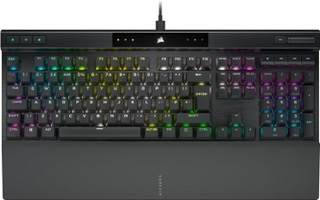
Full-size mechanical gaming keyboard with aluminium frame
Per-key RGB backlighting
CORSAIR AXON hyper-processing technology for ultra-fast input
CHERRY MX RGB Red linear mechanical switches
Rated for 100 million keystrokes
Double-shot PBT keycaps with standard bottom row
Tournament switch for distraction-free competitive play
Detachable braided USB-C cable
- Corsair K70 strengths:
Lighter design, gaming-focused switches - G413 TKL SE strengths:
More robust build, better keycap quality, cleaner design
The G413 TKL SE feels more premium on the desk, while the K63 leans more towards lightweight gaming setups.
Logitech G413 TKL SE vs HyperX Alloy Origins Core
This comparison usually comes down to budget versus refinement.


Durable PBT: Long-lasting, side-printed keycaps.
Fast Switches: Responsive; 80m-click lifespan.
Aluminum Frame: Solid, stable build.
NGENUITY Software: Custom lighting and macros.
Bright RGB: Exposed LEDs for extra glow.
TKL Design: Compact; extra mouse space.
- HyperX strengths:
Smoother switches, RGB lighting, higher-end feel - G413 TKL SE strengths:
Lower price, simpler design, excellent durability for the cost
If RGB and ultra-smooth switches matter, HyperX is a step up. If value and restraint matter more, Logitech wins.
Quick Comparison Table
| Keyboard | Best For | Key Difference |
|---|---|---|
| Logitech G413 TKL SE | Value-focused buyers | Durable, minimal, affordable |
| Keychron C1 | Customisation fans | Hot-swappable switches |
| Corsair K70 | Lightweight gaming | Compact and portable |
| HyperX Alloy Origins Core | Premium gaming | RGB and smoother switches |
Final Thoughts: Is the Trend Justified?
The rising interest in the Logitech G413 TKL SE isn’t driven by hype or novelty. It’s driven by something more sustainable: practical value.
As more people look for dependable, well-built tech that fits real-world use — not just marketing promises — products like this naturally gain attention. The G413 TKL SE offers a sensible balance of performance, comfort, and price, which explains why so many buyers are now searching for it.
If you’re looking for a straightforward mechanical keyboard that quietly does its job well, the trend makes perfect sense.
FAQs
Is the Logitech G413 TKL SE good for typing?
Yes. Its tactile mechanical switches provide clear feedback without being overly loud, making it suitable for both typing and gaming.
Is the Logitech G413 TKL SE hot-swappable?
No. The switches are not hot-swappable, which means you can’t easily replace them without soldering.
Does the Logitech G413 TKL SE have RGB lighting?
No. It uses simple white backlighting, which appeals to users who prefer a clean, distraction-free setup.
Is the Logitech G413 TKL SE good for work and gaming?
Yes. Its TKL layout, solid build, and balanced switches make it well-suited for mixed use, including work, study, and gaming.
Why is the Logitech G413 TKL SE cheaper than other mechanical keyboards?
It focuses on core performance and durability rather than premium extras like RGB effects or advanced customisation.
What type of user should avoid this keyboard?
Users who want extensive customisation, hot-swappable switches, or advanced lighting features may prefer alternative models.