• About us
  • Privacy & Policy
  • Contact Us
Guest Post
Expert Kingdom
  • Home & Garden
    • Cleaning
    • Home Appliances
    • Kitchen
    • Office
  • Tech
    • Apps
    • Cameras
    • Computers
    • Gadget
    • Laptops
    • Printers
    • Startup
    • Tablets
    • TV
  • Lifestyle & Health
    • Biking
    • Dental Care
    • Fitness
    • Health
    • Travel
  • Gifts
    • Gifts for Dads
    • Gifts for Daughter
    • Gifts for Her
    • Gifts for Him
    • Gifts for Moms
    • Gifts for Son
  • News
    • Science
  • Review
  • Best Of
Donation
No Result
View All Result
  • Home & Garden
    • Cleaning
    • Home Appliances
    • Kitchen
    • Office
  • Tech
    • Apps
    • Cameras
    • Computers
    • Gadget
    • Laptops
    • Printers
    • Startup
    • Tablets
    • TV
  • Lifestyle & Health
    • Biking
    • Dental Care
    • Fitness
    • Health
    • Travel
  • Gifts
    • Gifts for Dads
    • Gifts for Daughter
    • Gifts for Her
    • Gifts for Him
    • Gifts for Moms
    • Gifts for Son
  • News
    • Science
  • Review
  • Best Of
No Result
View All Result
Expert Kingdom
No Result
View All Result

MacBook Neo Accessories for Work & Travel: The Best Add‑Ons to Elevate Apple’s New Laptop

A A
MacBook Neo on a desk with stand, Thunderbolt dock, charger and mouse arranged neatly for a work and travel setup.

Table of Contents

Toggle
  • What Exactly Is a MacBook Neo Accessory?
  • Key Features to Look For
  • The Best MacBook Neo Accessories You Can Buy
  • How to Choose the Right MacBook Neo Accessories for You
  • Common Mistakes to Avoid
  • Maintenance, Safety, and Longevity Tips
  • Frequently Asked Questions
  • Final Verdict

If you’ve recently made the jump to the MacBook Neo, you may already be discovering just how capable Apple’s latest laptop really is—yet also wondering how to get the most out of it when life pulls you between work, travel, and everything in between. I remember unboxing mine and realising that although the machine itself was superbly engineered, the real transformation came from pairing it with the right accessories. The subtle improvements—better ergonomics, smarter charging, cleaner cable management—made a far bigger difference to my daily comfort than I expected.

After testing countless accessories over the years—some brilliant, some forgettable, and the occasional hidden gem—I’ve put together this MacBook Neo accessories guide to help you separate the useful from the unnecessary. Think of it as a curated shortlist of add‑ons that genuinely elevate your setup, reduce clutter, and make the MacBook Neo feel even more at home in your work‑and‑travel routine.

What Exactly Is a MacBook Neo Accessory?

A MacBook Neo accessory is any add-on that enhances the laptop’s functionality, protection, or ergonomics. That might be something practical—like a hub that brings back familiar ports—or something comfort-focused, such as a laptop stand that stops your shoulders from tightening after hours of typing.

Accessories can range from simple carry sleeves to advanced Thunderbolt docks and noise-reducing Bluetooth earphones. In everyday use, they help you work more comfortably, connect more devices, or protect your investment from scratches and wear.

In the UK, space can be tight—many of us work from small flats, shared homes, or a corner of the kitchen table—so smart, compact accessories that don’t dominate your workspace can make all the difference. UK sockets, bag sizes, and commuting habits also influence what works best.

Key Features to Look For

Essential Features

  • Sturdy build quality
    Accessories take daily knocks—from backpacks, desks, and travel—so materials matter.
  • Portability
    For commuters or students, lightweight gear makes the biggest difference.
  • Compatibility
    Some accessories fit all laptops; others are designed specifically for the MacBook Neo’s profile.
  • Heat management
    A stand or pad that improves airflow helps maintain smooth performance.

Advanced or Premium Features

  • Thunderbolt 4 hubs with high-speed data transfer
    Ideal for creatives who move large files or multiple displays.
  • Magnetic locking mechanisms
    Offer quicker, cleaner attachment for chargers and stands.
  • Noise-optimised peripherals
    Quiet keyboards, silent mice, and whisper‑calm fans help in shared UK spaces.

Optional Extras (Nice to Have)

  • Adjustable stands
    Handy if you shift between sitting and standing.
  • Multi‑device Bluetooth keyboards
    Great for people managing tablets, phones, and work laptops.
  • Travel‑friendly organisers
    Perfect for keeping cables tidy when hopping between co‑working spots.

The Best MacBook Neo Accessories You Can Buy

After testing a wide range of accessories, here are five products that consistently improve the MacBook Neo experience.


Satechi Thunderbolt 4 Dock

This dock feels reassuringly solid, and the weight keeps it planted on the desk. Day to day, I found it handles multiple displays and high‑speed drives without a hiccup. It runs cool under load, and the rear‑facing ports help keep UK desks much tidier.

SATECHI 5-in-1 Thunderbolt 4 Slim Hub Docking Station with 8K or Dual 4K Display, 60W PD Charging, Three Thunderbolt 4 Downstream Ports and USB 3.2 Gen 2 – for MacBook Air & Pro, Laptop, PC and More

SATECHI 5-in-1 Thunderbolt 4 Slim Hub Docking Station with 8K or Dual 4K Display, 60W PD Charging, Three Thunderbolt 4 Downstream Ports and USB 3.2 Gen 2 –...

4.0
£199.99
in stock
BUY NOW
Amazon.co.uk


Key Features
– Thunderbolt 4 ports
– Gigabit Ethernet
– Multiple USB‑A and USB‑C ports
– 4K/8K display support

Pros

– Feels stable and premium
– Excellent bandwidth for creatives
– Keeps desk cables organised
– Runs cooler than many hubs
– Smooth performance with external SSDs

Cons

– On the pricier side
– Requires its own power brick
– More ports than some users need
– Slightly bulky for travel

Also available from

eBay
Satechi Thunderbolt 4 Slim Hub Docking Station Or Dual 5-IN-1 8K 4K ST-T4SHM-UK
£139.49
£187.49
Free delivery
in stock
Amazon.co.uk
SATECHI 5-in-1 Thunderbolt 4 Slim Hub Docking Station with 8K or Dual 4K Display, 60W PD Charging, Three Thunderbolt 4 Downstream Ports and USB 3.2 Gen 2 –...
SATECHI 5-in-1 Thunderbolt 4 Slim Hub Docking Station with 8K or Dual 4K Display, 60W PD Charging, Three Thunderbolt 4 Downstream Ports and USB 3.2 Gen 2 – for MacBook Air & Pro, Laptop, PC and More
£199.99
+ Delivery *
in stock
* Delivery cost shown at checkout.

Best For
Power users who want a proper desktop setup.
Check the latest price on Amazon.co.uk.


Twelve South Curve Flex Stand

The Curve Flex is one of those accessories that quietly improves everyday comfort. The adjustable tilt helps align the screen with your eyes, reducing neck strain. It folds surprisingly flat, making it easier to carry between home and office.

Amazon's Choice
Twelve South Curve Flex | Ergonomic Height & Angle Adjustable Aluminum Laptop/MacBook Stand/Riser, fits 10"-17", folds flat for portability -travel pouch included, matte black

Twelve South Curve Flex | Ergonomic Height & Angle Adjustable Aluminum Laptop/MacBook Stand/Riser, fits 10"-17", folds flat for portability -travel pouch...

4.0
£58.89
in stock
BUY NOW
Amazon.co.uk


Key Features
– Adjustable height and angle
– Aluminium build
– Foldable design

Pros


– Eases shoulder tension
– Very stable even at full height
– Looks natural on any desk
– Excellent for video calls

Cons


– Not the cheapest stand
– Can wobble slightly on uneven surfaces
– Requires an external keyboard and mouse

Also available from

eBay
Twelve South Curve Flex Ergonomic Laptop/ MacBook Stand Fits for 10"-17"-BLACK
£54.99
Free delivery
in stock
Amazon.co.uk
Amazon's Choice
Twelve South Curve Flex | Ergonomic Height & Angle Adjustable Aluminum Laptop/MacBook Stand/Riser, fits 10"-17", folds flat for portability -travel pouch...
Twelve South Curve Flex | Ergonomic Height & Angle Adjustable Aluminum Laptop/MacBook Stand/Riser, fits 10"-17", folds flat for portability -travel pouch included, matte black
£58.89
+ Delivery *
in stock
* Delivery cost shown at checkout.

Best For
Anyone who works long hours at a laptop.
Check the latest price on Amazon.co.uk.


Native Union Stow Slim Sleeve

A slim, padded sleeve that feels carefully stitched rather than mass-produced. It slips effortlessly into backpacks and keeps the MacBook Neo well protected without bulk.

Suitable for Macbook Neo
Native Union Stow Slim for MacBook Air 13” (2018 & Later)

Native Union Stow Slim for MacBook Air 13” (2018 & Later)

4.0
£59.99
in stock
BUY NOW
Amazon.co.uk


Key Features
– Slim profile
– Soft internal lining
– Weather‑resistant materials

Pros


– Excellent for commuting
– Stylish without trying too hard
– Offers great scratch protection

Cons


– Limited storage for accessories
– Slightly snug fit until broken in

Also available from

eBay
Native Union Stow Slim MacBook Sleeve Premium with Magnetic Closure – Indigo
£39.99
Free delivery
in stock
Amazon.co.uk
Suitable for Macbook Neo
Native Union Stow Slim for MacBook Air 13” (2018 & Later)
£59.99
+ Delivery *
in stock
* Delivery cost shown at checkout.

Best For
Users who travel light but want solid protection.
Check the latest price on Amazon.co.uk.


Logitech MX Anywhere 3S

Small but surprisingly capable, this mouse glides smoothly even on glossy UK kitchen tables. The scroll wheel feels refined, and switching devices is effortless.

Logitech MX Anywhere 3S Compact Wireless Mouse, Fast Scrolling, 8K DPI Any-Surface Tracking, Quiet Clicks, Programmable Buttons, USB C, Bluetooth, Windows PC, Linux, Chrome, Mac - Graphite

Logitech MX Anywhere 3S Compact Wireless Mouse, Fast Scrolling, 8K DPI Any-Surface Tracking, Quiet Clicks, Programmable Buttons, USB C, Bluetooth, Windows...

5.0
£67.98
in stock
BUY NOW
Amazon.co.uk

Key Features
– Silent buttons
– Multi‑device pairing
– USB‑C charging

Pros


– Ideal for small workspaces
– Quiet in shared environments
– Excellent battery life
– Compact but comfortable

Cons


– Small size won’t suit everyone
– No USB‑A dongle included

Also Available from

eBay
Logitech MX Anywhere 3S Compact Wireless Performance Mouse
£59.99
Free delivery
in stock
Amazon.co.uk
Logitech MX Anywhere 3S Compact Wireless Mouse, Fast Scrolling, 8K DPI Any-Surface Tracking, Quiet Clicks, Programmable Buttons, USB C, Bluetooth, Windows...
Logitech MX Anywhere 3S Compact Wireless Mouse, Fast Scrolling, 8K DPI Any-Surface Tracking, Quiet Clicks, Programmable Buttons, USB C, Bluetooth, Windows PC, Linux, Chrome, Mac - Graphite
£67.98
+ Delivery *
in stock
* Delivery cost shown at checkout.

Best For
Mobile workers who hop between locations.
Check the latest price on Amazon.co.uk.

You Might Be Intrested

Apple MacBook Neo Review – First Impressions of Apple’s New Lightweight Laptop


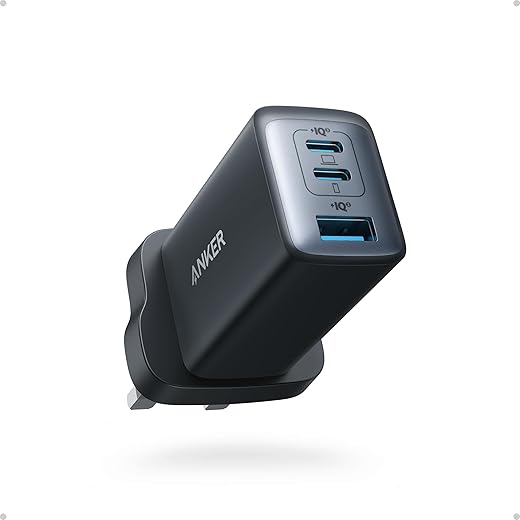
Anker Nano II 65W Charger

This compact charger is far smaller than the MacBook’s stock brick. It barely warms up during charging and fits easily in a pocket or organiser. Very suitable for travel.


Key Features
– 65W USB‑C output
– GaN technology
– Foldable prongs

Pros


– Saves weight in your bag
– Fast, reliable charging
– Stays cooler than typical chargers


Cons


– Two ports only
– Only works best with high-quality cables

Also Available from
Amazon.co.uk
Best Seller
Anker USB C Charger (Nano II 65W), PPS 3-Port Fast Charger Plug for MacBook Pro/Air, iPad Pro, Galaxy S20, Dell XPS 13, Note 20/10+, iPhone 17/16/16 Pro,...
Anker USB C Charger (Nano II 65W), PPS 3-Port Fast Charger Plug for MacBook Pro/Air, iPad Pro, Galaxy S20, Dell XPS 13, Note 20/10+, iPhone 17/16/16 Pro, Steam Deck, and More
£22.98
+ Delivery *
in stock
eBay
Anker USB C Plug, 735 Charger (Nano II 65W), PPS 3-Port Fast Compact USB C Charg
£29.01
Free delivery
in stock
* Delivery cost shown at checkout.

Best For
Travellers and commuters.
Check the latest price on Amazon.co.uk.

How to Choose the Right MacBook Neo Accessories for You

If you prioritise comfort, start with a stand and external keyboard. If you’re short on ports, a dock or hub should top your list. Those working in small UK flats might prefer compact, foldable gear to keep the table usable for dinner. For travellers, weight matters more than anything—choose slim sleeves, compact chargers, and a mouse that fits neatly into side pockets.

Common Mistakes to Avoid

Don’t buy a stand that’s too tall for your workspace; some UK desks sit higher than average. Avoid cheap hubs that overheat, as they can throttle performance. Don’t assume your old chargers are compatible—voltage and wattage matter. And watch out for accessories that look great online but take up too much space in smaller rooms.

Maintenance, Safety, and Longevity Tips

Wipe stands and sleeves regularly—they collect dust that can transfer to your laptop’s fans. Check cables for fraying, especially if you coil them tightly for travel. Accessories like chargers and hubs can get warm; store them somewhere ventilated, not buried in drawers. If you use a laptop stand, make sure the MacBook Neo has enough airflow to stay cool.

Frequently Asked Questions

What accessories are essential for a MacBook Neo?

A stand, sleeve, and hub are the top three essentials for most users.

Do I need a Thunderbolt dock?

Not unless you use monitors, SSDs, or professional peripherals.

Which charger works best as a travel option?

Compact GaN chargers are ideal for fast charging without the bulk.

Are Bluetooth mice reliable with the MacBook Neo?

Yes—modern models connect quickly and stay stable.

Do I need a case as well as a sleeve?

Only if you carry your laptop without a bag or travel frequently.

Will using a stand help with posture?

Definitely—raising the screen can noticeably reduce neck and shoulder strain.

Final Verdict

The MacBook Neo is brilliant on its own, but the right accessories turn it into a workstation tailored to your routine. For most users, the Curve Flex stand, Satechi dock, and a slim sleeve offer the best blend of comfort and practicality. Travellers will get more benefit from the Anker Nano II and MX Anywhere 3S. Whatever you choose, aim for accessories that make your daily setup smoother and more enjoyable rather than adding unnecessary clutter.


Share this:

  • Share on Facebook (Opens in new window) Facebook
  • Share on WhatsApp (Opens in new window) WhatsApp
  • Share on X (Opens in new window) X
  • Print (Opens in new window) Print
  • Share on LinkedIn (Opens in new window) LinkedIn
  • Email a link to a friend (Opens in new window) Email

Like this:

Like Loading...

You might be interested

Tags: Apple laptop accessoriesMacBook accessoriesMacBook Neoproductivity gear
Previous Post

The De’Longhi Magnifica Evo Deal No One Expected—Here’s What Makes It Different

Basel Al Mourad

Basel Al Mourad

Dr Basel Al Mourad is an Associate Professor at Zayed University in Dubai, UAE, specialising in Human-Computer Interaction, Digital Addiction, Web Development, Digital Marketing, and Digital Wellbeing. With a PhD in Computer Science, he explores the impact of technology on mental health and develops strategies to combat digital addiction and foster balanced digital habits. He also reviews the latest tech products, leveraging his expertise in user experience to evaluate their role in promoting healthier relationships with technology.

Related Posts

Laptop sitting open on a wooden desk displaying a colourful pink and blue screen

Apple MacBook Neo Review – First Impressions of Apple’s New Lightweight Laptop

Leave a Reply Cancel reply

Your email address will not be published. Required fields are marked *

I agree to the Terms & Conditions and Privacy Policy.

Disclaimer

We conduct unbiased reviews for our recommendations. When you make qualifying purchases through our links, we may earn affiliate commissions, helping us continue our work. Read more.

You Might Like

Bluetooth KeyboardsLogitech Bluetooth Keyboards: 7 Reasons to Choose for Effortless Typing Echo Dot Smart Speaker5 Stunning Echo Dot Smart Speaker models explained Google Pixel Watch 4 ReviewGoogle Pixel Watch 4: Is This the Smartwatch You’ve Been Waiting For? A PlayStation 5 console standing vertically on a wooden table next to a DualSense controller, with a large TV in the background displaying a vibrant PlayStation Plus logo in blue and yellow. Several PlayStation game cases are stacked on the table, and the scene includes a cozy living room setup with a floor lamp and a potted plant.PlayStation Plus January 2026: Predictions, Schedule & Smart Picks (Essential, Extra, Premium)
  • Latest
  • Trending
  • Comments
MacBook Neo on a desk with stand, Thunderbolt dock, charger and mouse arranged neatly for a work and travel setup.

MacBook Neo Accessories for Work & Travel: The Best Add‑Ons to Elevate Apple’s New Laptop

De'Longhi Magnifica Evo coffee machine on a modern kitchen counter with espresso and latte cups arranged around it.

The De’Longhi Magnifica Evo Deal No One Expected—Here’s What Makes It Different

Laptop sitting open on a wooden desk displaying a colourful pink and blue screen

Apple MacBook Neo Review – First Impressions of Apple’s New Lightweight Laptop

Four smart video doorbells and a solar panel placed upright on a light‑coloured table in a testing environment

Before You Buy a Video Doorbell, Read This: Four Designs That Work in Very Different Ways

Samsung QLED TV on a stand displaying a vibrant multicolor abstract pattern with thin bezels and modern design.

Before You Buy a Samsung Q7F: The Hidden Differences Across Generations

Bluetooth Sound Bar for TV

Best Bluetooth Sound Bar for TV under £99 

Bean to Cup Coffee Machine

Brewing Perfection: Best 3 Bean to Cup Coffee Machines

Exercise Bikes

Top Exercise Bikes for Fitness & Wellbeing – Expert Recommendations

Bluetooth Earbuds under 30 pounds

Discover Best 4 Bluetooth Earbuds Under £30: A Comprehensive Guide

Bluetooth Sound Bar for TV

Best Bluetooth Sound Bar for TV under £99 

Foot Massagers for Circulation

Foot Massagers for Circulation: Boost Your Health and Comfort

Mobile Phones for the Elderly

Discover the Perfect Mobile Phones for the Elderly; 3 Easyfone Models to Keep Them Connected

Popular Articles

  • Samsung QLED TV on a stand displaying a vibrant multicolor abstract pattern with thin bezels and modern design.

    Before You Buy a Samsung Q7F: The Hidden Differences Across Generations

    31 shares
    Share 12 Tweet 8
  • Best Bluetooth Sound Bar for TV under £99 

    16 shares
    Share 6 Tweet 4
  • Brewing Perfection: Best 3 Bean to Cup Coffee Machines

    14 shares
    Share 6 Tweet 4
  • Top Exercise Bikes for Fitness & Wellbeing – Expert Recommendations

    13 shares
    Share 5 Tweet 3
  • Dyson Handheld Vacuum Cleaner

    11 shares
    Share 4 Tweet 3
Expert Kingdom Logo

Unbiased Insights, Informed Choices: Your Trusted Guide to Product Reviews

Follow Us

Browse by Category

  • Apps
  • Beauty
  • Bedroom
  • Best Of
  • Biking
  • Books
  • Cameras
  • car accessories
  • Cleaning
  • Computers
  • Dental Care
  • Fitness
  • Gadget
  • Gardening
  • Gifts
  • Gifts for Dads
  • Gifts for Daughter
  • Gifts for Her
  • Gifts for Him
  • Gifts for Moms
  • Gifts for Son
  • Health
  • Home & Garden
  • Home Appliances
  • Kitchen
  • Laptops
  • Lifestyle & Health
  • Mobile Phones
  • News
  • Office
  • Printers
  • Review
  • Science
  • Tablets
  • Tech
  • Travel
  • TV
  • Uncategorized

Recent News

MacBook Neo on a desk with stand, Thunderbolt dock, charger and mouse arranged neatly for a work and travel setup.

MacBook Neo Accessories for Work & Travel: The Best Add‑Ons to Elevate Apple’s New Laptop

De'Longhi Magnifica Evo coffee machine on a modern kitchen counter with espresso and latte cups arranged around it.

The De’Longhi Magnifica Evo Deal No One Expected—Here’s What Makes It Different

  • About us
  • Privacy & Policy
  • Contact Us

© Expert Kingdom Powered by AlepMedia.com

Table of Contents

×
  • What Exactly Is a MacBook Neo Accessory?
  • Key Features to Look For
  • The Best MacBook Neo Accessories You Can Buy
  • How to Choose the Right MacBook Neo Accessories for You
  • Common Mistakes to Avoid
  • Maintenance, Safety, and Longevity Tips
  • Frequently Asked Questions
  • Final Verdict
→ Table of Content
No Result
View All Result
  • Home & Garden
    • Home Appliances
    • Kitchen
  • Tech
    • Apps
    • Cameras
    • Computers
    • Gadget
    • Laptops
    • Mobile Phones
    • Printers
    • Tablets
    • TV
  • Lifestyle & Health
    • Biking
    • Dental Care
    • Fitness
    • Health
    • Travel
  • Gifts
    • Gifts for Dads
    • Gifts for Daughter
    • Gifts for Her
    • Gifts for Him
    • Gifts for Moms
    • Gifts for Son
  • News
    • Science
  • Review
  • Best Of
  • Donation
  • Write for Us | Submit Guest Post
  • Affiliate Disclosure

© Expert Kingdom Powered by AlepMedia.com

This website uses cookies. By continuing to use this website you are giving consent to cookies being used. Visit our Privacy and Cookie Policy.

Discover more from Expert Kingdom

Subscribe now to keep reading and get access to the full archive.

Continue reading

Go to mobile version
%d