
HP looks to sharpen HP’s premium convertible formula
HP is expanding its OmniBook X line with the OmniBook X Flip 2‑in‑1, a flexible laptop aimed squarely at professionals and students who want one device to cover work, note‑taking and light creative use. This HP OmniBook X Flip 2‑in‑1 review takes a news‑led look at what the device brings to the table, why it matters now, and how it fits into the crowded 2‑in‑1 market in 2026.
HP’s announcement builds on the company’s quiet shift away from the Spectre name and towards a more streamlined OmniBook family, positioning the X Flip as a premium but practical convertible that sits above entry‑level 2‑in‑1s without drifting into workstation territory.
What’s new about the HP OmniBook X Flip 2‑in‑1
The OmniBook X Flip 2‑in‑1 is HP’s latest take on the 360‑degree convertible. It’s available in both 14‑inch and 16‑inch sizes and is built around a familiar idea: one machine that can act as a laptop at a desk, a tablet on the sofa, or a tented display for watching video.
What makes this release noteworthy is the shift to newer processor platforms and display technology. HP is offering configurations with Intel Core Ultra or AMD Ryzen AI chips, paired with high‑resolution OLED touchscreen options and support for stylus input.
From experience with earlier OmniBook X Flip and Spectre‑era models, these updates usually translate into snappier everyday performance, better efficiency, and noticeably richer screens — things that matter more than raw benchmark numbers for most buyers.
Key features and early impressions

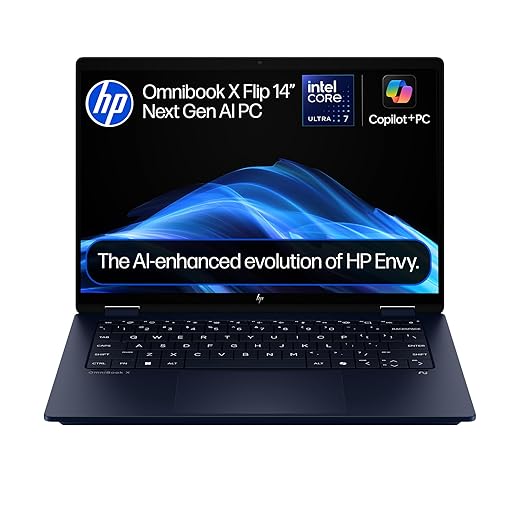
HP OmniBook X Flip 2-in-1 Next Gen AI 14" Laptop | CoPilot+ PC | Intel® Core™ Ultra 7-256V Processor | 16GB RAM | 1TB SSD | Intel Arc™ 140V Graphics | 2K...
- 14‑inch and 16‑inch convertible designs with a full 360‑degree hinge
- OLED touchscreen options up to 3K resolution on select models
- Intel Core Ultra or AMD Ryzen AI processor options, depending on configuration
- Up to 32GB of LPDDR5x memory and fast NVMe SSD storage
- Wi‑Fi 7 support on newer configurations
- Aluminium chassis using recycled materials, continuing HP’s sustainability push
- USB‑C, USB‑A and HDMI connectivity, avoiding the need for constant dongles
Based on time spent with similar HP convertibles, the build is likely to feel reassuringly solid rather than ultra‑light. HP tends to prioritise hinge stability and typing comfort, which usually results in a device that feels planted on a desk and secure in tablet mode, even if it’s not the lightest in a bag.
Performance in real use
Day‑to‑day performance should be comfortably in line with what most people expect from a premium Windows convertible. Office work, browser‑heavy multitasking, video calls, and light creative tasks should feel smooth, especially on the newer Intel and AMD platforms HP is using here.
OmniBook X Flip Verdict
The OmniBook X Flip 2‑in‑1 is best suited to students, home workers and professionals who move between typing, presenting and casual media use throughout the day
Flexible 2‑in‑1 design that genuinely suits mixed use
OLED display options promise excellent contrast and colour
Sensible port selection for a thin convertible
Processor choices allow buyers to balance performance and efficiency
Likely heavier than simpler clamshell laptops
OLED models may trade some battery life for image quality
Thermal performance is likely to be tuned conservatively. Previous OmniBook X Flip models favour quiet operation and steady performance rather than short bursts of peak speed, which suits library work, lectures and long meetings at home.
Battery life claims vary by configuration, but HP is clearly targeting all‑day use for typical productivity rather than multi‑day endurance. In practice, UK users can likely expect a full working day away from the charger, possibly more with sensible brightness settings on the OLED display.






Who the HP OmniBook X Flip 2‑in‑1 is for
The OmniBook X Flip 2‑in‑1 is best suited to students, home workers and professionals who move between typing, presenting and casual media use throughout the day. It’s particularly appealing if you value screen quality, pen input and flexibility over absolute portability or gaming performance.
Final verdict
At this early stage, the HP OmniBook X Flip 2‑in‑1 looks like a confident, evolutionary update rather than a radical rethink. That’s no bad thing. Based on experience with earlier models, HP is refining a design that already works well, pairing it with stronger processors and more attractive displays.
If pricing stays competitive in the UK, the OmniBook X Flip 2‑in‑1 should appeal to anyone looking for a single, well‑built device that comfortably handles work, study and downtime — provided you’re happy with the trade‑offs that come with a premium convertible.
Frequently Asked Questions
Is the HP OmniBook X Flip 2‑in‑1 a good replacement for a tablet?
It can cover many tablet‑style tasks, especially with a stylus, but it’s heavier than a dedicated slate.
Will there be an OLED display option in the UK?
Yes, OLED touchscreen options are expected on UK models.
Does the OmniBook X Flip support a pen?
HP supports optional stylus input on compatible configurations.
Is this laptop suitable for students?
Yes. Its flexibility suits note‑taking, coursework and media use.
What operating system does it run?
The OmniBook X Flip ships with Windows 11.